Seite 11
Prof. J. WALTER Kurstitel
Stand: Januar 2000


ACPI Windows
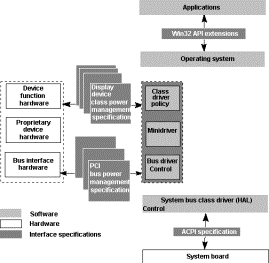
| ACPI, eine
Gemeinschaftsentwicklung von Intel, Microsoft und Toshiba, wurde am
6. Januar 1997 vorgestellt (in Englisch). Es handelt sich um eine offene
(von jedem Hersteller verwendbare) und umfassende Schnittstellenspezifikation
für den Informationsaustausch zwischen PC-Hardware, Betriebssystem und
Peripheriegeräten. Die Spezifikation legt also ein Format fest, in dem
Betriebssystem, Motherboard-Hardware und Peripheriegeräte (CD-ROM-Laufwerke,
Festplatten usw.) gegenseitig Daten über den Energieverbrauch austauschen
können. Das Hauptziel von ACPI ist, das Operating System Directed Power
Management (OSPM) zu ermöglichen, bei dem das Betriebssystem Zugriff auf alle
Power-Management-Funktionen hat und damit den Energieverbrauch der einzelnen
Geräte präzise an den jeweiligen Bedarf anpassen kann. Ältere
Power-Management-Systeme wurden über das BIOS gesteuert und konnten Geräte
nur schematisch nach einer bestimmten Zeit der Inaktivität abschalten. |
|
| Systeme mit ACPI werden mit
ihren überragenden Power-Management-Verfahren nun auf dem Markt verfügbar
sein. Verbesserungen ergeben sich dabei durch ein hochentwickeltes
Power-Management für das gesamte System: Betriebssystem, Motherboard-Hardware
und Peripheriekomponenten. |
|
| Intel bietet zur
Unterstützung der Entwicklung hochleistungsfähiger, umfassend ausgestatteter
und energieeffizienter Systeme Tools (in Englisch) und Leitlinien an. Der
Einsatz dieser Tools gestattet Systemherstellern, das Power-Management für
Systemkomponenten und Anwendersoftware zu testen. |
|
| •Automating Internet updates or system-maintenance
utilities. An Internet application can schedule times to turn on the PC
so the application can download information from the Internet without user
attendance. Management applications can schedule off-peak times to wake the
PC to run activities such as software downloading, backup, or maintenance.
Such applications can use the OnNow extension APIs to inform the operating
system when activities are complete so that the PC can be immediately put
back to sleep. |
|
| •Handling docking changes for mobile users.
Consider the following scenario: You are working on a file stored on the
network or on a disk in a docking station. But you're late for a flight, so
you put the PC to sleep, undock, and leave. Later, at home or in your hotel
room, you turn on the PC. If the application is not OnNow-aware, it might
hang or fault when it tries to access the file. By handling the sleep and
wake events, the application can smoothly manage the situation by telling the
user what happened and offering to save the work to another location until
the original volume is available. |
|
| •Preserving network connections. This scenario is
similar to the docking scenario: When the PC goes to sleep, network
connections on the server are lost, files are closed, and file locks are
freed. An OnNow-aware application can automatically handle this by performing
a local auto-save when the system goes to sleep. When the system wakes, the
application can re-establish its connection and silently allow the user to
continue working. |
|
| •Keeping presentations online. Every presenter has
seen a laptop turn off or go blank in the middle of a presentation. While a
slide is being displayed, the PC perceives itself to be idle, as if the user
has left it alone; no CPU is needed and no user input is coming in. An
OnNow-aware application tells the operating system that the PC is being used,
thus preventing the screen or PC from turning off. |
|
| •Extending mobile battery life. Battery life is
essential to laptops. The application's use of the CPU and hard disk
drastically affects battery life. Performing non-essential background tasks
in the idle loop prevents the CPU from entering a low power state. By taking
advantage of OnNow capabilities, an application can find out whether the PC
is running on batteries and, if so, can turn off some of the application
background tasks. Further, an application can postpone low-priority disk I/O
to be performed only when the hard drive is running. |
|
| •Handling events for network agents and peripherals.
Both network agents and applications for peripherals such as fax machines can
deliver continuous functionality (24 hours per day, months at a time) without
requiring the PC to run at full power to execute tasks when events occur. |
|